Home > Working with Planning Projects > Building an Application > Building Application Models > Building A Transaction Model > Additional Definition for an Expression field
Additional Definition for an Expression field
Last Updated 2/28/2012 2:19 AM
Additional Definition for an Expression field (Numeric or String)
Selecting the Numeric or String Expression data type, will prompt for additional information using a pop-up display.
For Numeric Expression, it will list all the numerical data type (INTEGER, VALUE, DATE, Numeric Lookup), as for other Numeric Expression field you have to type the field name manually.
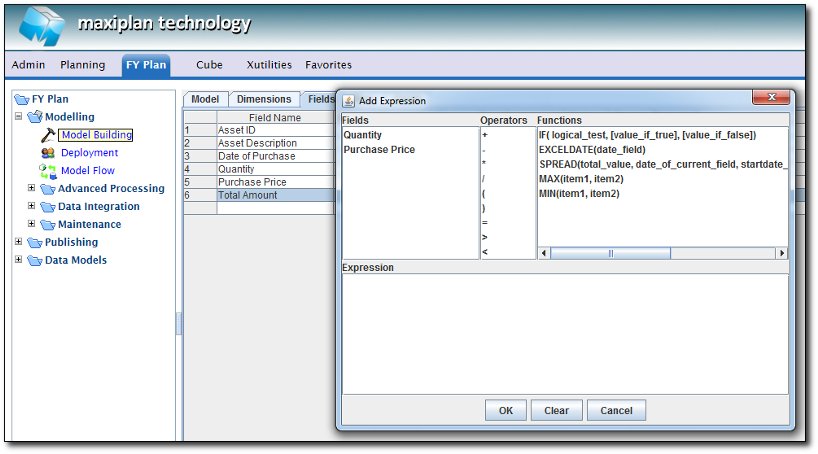
There are some operators can be used in the formula : +, - , *, /, (, ), = , > , <
And there are some functions can be used in the formula :
IF (Logical_test, value if true, value if false) - to check a condition from another numerical field
EXCELDATE (date_field) - to return an excel date from a Date field
SPREAD (total_value,date_of_current_field, startdate_of_the_spread,enddate_of_the_spread,m|y|d) - to Spread a value based on the given date in the formula
Total Value : The total amount that will be spread per month, year or day , depending on the last argument 'm','y','d'
Date of Current Field: This is the period into which the spread amount will be calculated. It will assume day, month or year according to the date, eg 3/2/09 will assume February for month spreading, 2009 for year spreading etc
Start date of the Spread: This is the first day of the date range to be spread into
End Date of the Spread: This is the last day of the date range to be spread into.
'M','Y','D': Periodicity to be spread into.
Example : For Field Called January , = SPREAD(total value ,'1/1/09',start date ,end date ,'m'), where total value, start date, end date is referring to other field
MAX(item1,item2) - to find whichever field has the highest value
MIN(item1,item2) - to find whichever field has the lowest value
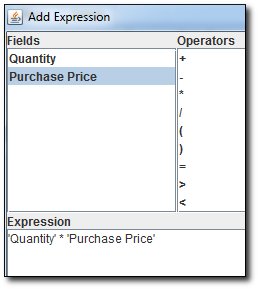
For example, if we want to build a CAPEX model, where we define the Quantity of item & Price for each item, we can calculate the Total Amount to be Quantity * Purchase Price
For String Expression, it will list down all the text type field
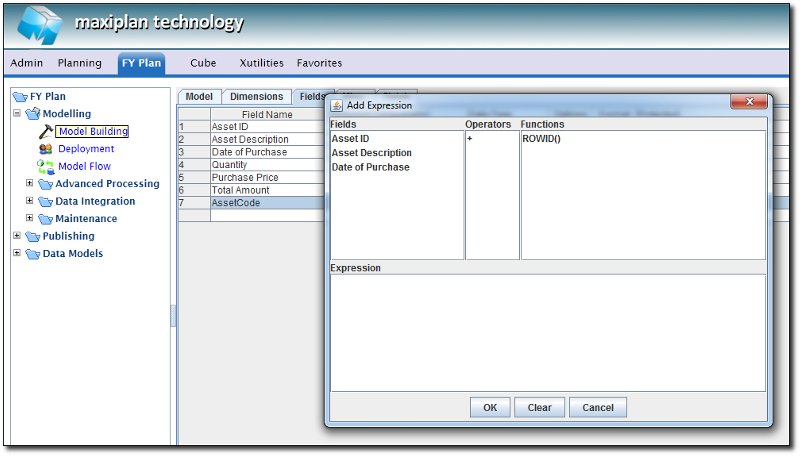
The only available operators is + , which is used to combine text fields
The only functions available is ROWID() which is returning the number of the Record Rows.
For example of CAPEX model, where we want to combine the Asset ID & Asset Description to be AssetCode field, we can put the string expression to be like this :
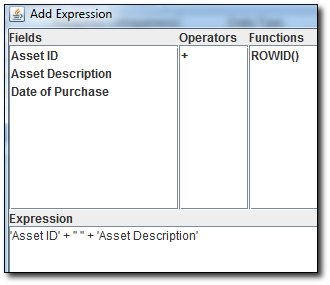
For any string that need to be included into the Expression, you will need to use double quote " in between
See also
|


 Page URL: