Home > Working with Planning Projects > Building an Application > Building Application Models > Building A Transaction Model > Defining Transaction Model Fields
Defining Transaction Model Fields
Last Updated 3/11/2012 8:35 PM
Next we define the fields we want to capture in our Transaction Model.
Transactional Models provide a way of collecting data that does not ideally fit a multidimensional cube structure.
Very often we need to collect an indeterminate number of records or transactions for certain data.
For example, if our travel costs were entered based on the trips planned, we do not know exactly how many trips a particular cost centre or entity would enter into the plan. Similarly, if we wish to collect details on planned CAPEX acquisitions, we do not know how many items a particular entity may wish to acquire.
Another problem is that such data often contains items other than numeric, such as a persons name (text), the travel date (date), a predefined category (list), etc.
Such data can be held in a multidimensional data cube (Cube Model), but catering for the many different data types could impact on the multidimensional cube's primary objective, which is very fast consolidation, and slice and dice data viewing.
So when we define fields for a Transaction Model, we are defining the various data types that make up a record of data.
To define the fields required, click on the Fields tab of the Transaction Model definition applet.
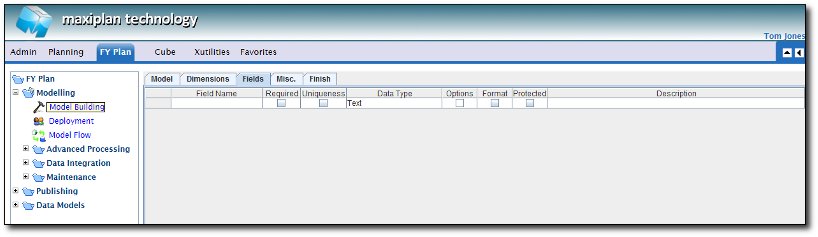
To define a new field, enter the name you want to give to the field (e.g. Employee Name), select a Data Type, and a Description (optional).
For certain field types (e.g. List), you will be prompted for further information.
You can also check the boxes for Required and Uniqueness, if applicable.
These options will have the following impact:
Required - if checked, this field is compulsory and cannot be left blank.
Uniqueness - if checked, the value entered must be unique.
The Data Type can be any of the following:
| TEXT |
Used to store free from text information. Limited to only 255 Characters
|
| DATE |
Used for dates. Any data entered into a DATE field must be in dd/mm/yyyy format. |
| LIST |
Used to specify a list of values entered in manually, or obtained from an existing Cube Model dimension. The list of values will be offered as a drop down list when data entry is made. |
| INTEGER |
Used to store an integer value. |
| VALUE |
Used to store numbers containing decimal places. The number will actually be stored in double precision floating point format.
|
| NUMERIC EXPRESSION |
A Numeric Expression field is an numeric expression field and may be computed from other numerical fields (Integer, Value, Date, Numeric Lookup or Numeric Expression type) |
| STRING EXPRESSION |
A String Expression field is a string expression field and may be computed from other text fields (TEXT, or LIST)
|
| NUMERIC LOOKUP |
A Numeric Lookup field performs a lookup on another Cube model, and will retrieve value based on a match with a dimension member or the drop list on that model
|
| STRING LOOKUP |
A String Lookup field performs a lookup on another transaction model, and will retrieve text based on a match with a dimension member or the drop list on that model
|
| RECORD CREATION DATE |
A field to specify the record creation date automatically when user input the record line |
| RECORD MODIFICATION DATE |
A field to specify the record modification date automatically when user modify the record line
|
| MEMO |
A Memo Field, which does not have any character limitation. |
The Option column will be highlighted if there is additional specification. List, Numeric & String Expression and Numeric & String Lookup fields all require additional information. While some other fields such as Text, Date, Integer, Value has an optional option for each type.
See also
See also
|


 Page URL: