Home > Working with Planning Projects > Building an Application > Advanced Project Functions > Maintenance > Versions
Versions
Last Updated 3/6/2012 11:32 PM
Cascade Planning provides a Version dimension to keep track of different versions of the data. For example, we might wish to define Versions Actual, Budget, Forecast and Last Year. We must create at least one Version before we can build a model within a project. Versions are common across all models in a project.
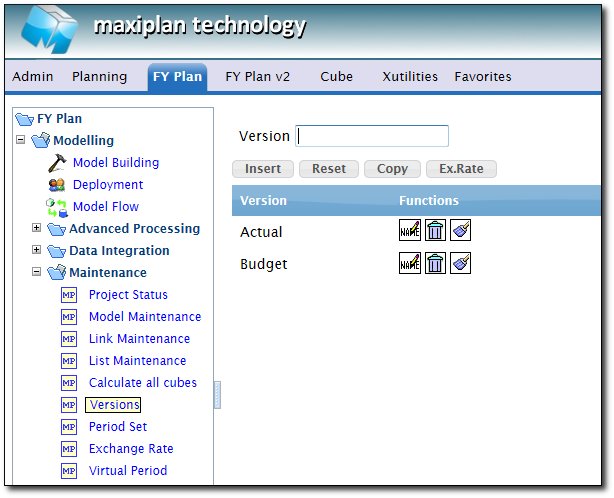
To maintain Versions in a project, Go to : Modelling > Maintenance > Versions
Creating New Version :
To create a new version, type in the Version name into the box , and then click Insert button, to clear the name, Click on Reset button
Copy Data between Version :
To copy data between Version, Click on Copy button, it will pop up a box to define what is the source version and what is the target version
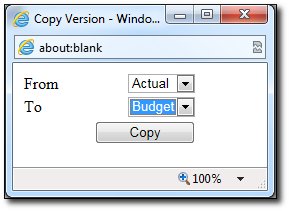
Click on Copy button to start copying the data. It will copy all data from Source version to the Target Version, as long as the model has the Version enabled.
Define Exchange Rate for the Version
By Default , all version of data will use the same exchange rate as defined in the model building. However we can set different exchange rate for different version in a model.
For example, Expenses model will capture Budget & Actual expenses data, the rate used for Budgetting & Actual data is obviously will be different.
To setup the exchange rate for each version of the Expenses model, we need to click on the Rate button
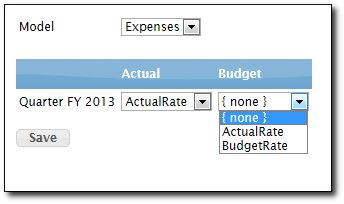
Select the model from the droplist, then Choose the Rate for each Version based on the existing Rate (with {none} meaning that it will use whatever Exchange Rate defined in the Model building for the model)
Renaming a version
To rename a version, click on Rename button
Deleting a version
To delete a version, click on Delete button, it will delete the version from the project and all the data associated with the version. You must leave at least 1 version left.
Zeroizing a version
To zeroize a data in a version, click on Zeroize button. It will delete all the data associated with the version
See also
| 


 Page URL: