Home > Reports and Scripting > Define Scripts
Define Scripts
Last Updated 5/28/2012 10:29 PM
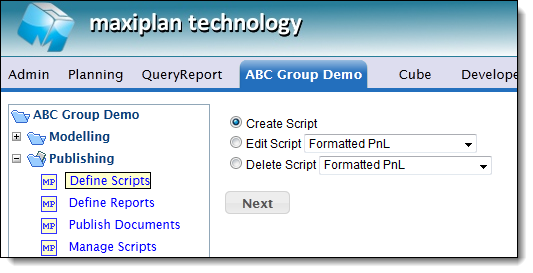
The Define Scripts function provides a script editor for both report and application scripts. To create a new report script select the Create Script option:
This will open a script editor. Enter a name for the script (alphanumeric characters only and no spaces).
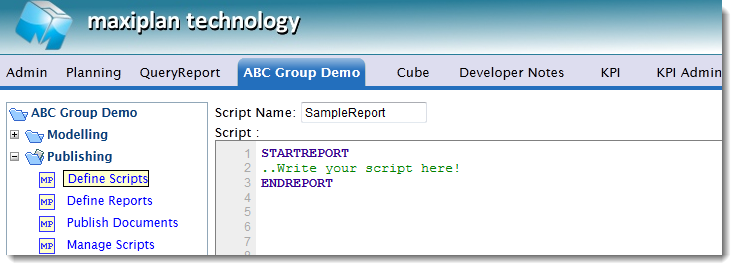
A Maxiplan report script comprises a sequence or reporting commands contained within a STARTREPORT/ENDREPORT block. For example the following script:
STARTREPORT
PROJECT 'ABC Group Demo'
MODEL 'Profit and Loss'
COLUMNWIDTH 150,1
COLUMNWIDTH 75,2-13
STYLE DATA DECIMALS 0
DROPLIST 'Countries'
ACROSS 'Period'
DOWN 'Measure'
HEADINGS
ROWS 'All'
ENDREPORT
Would produce a simple report showing the Profit and Loss Model with Periods across as columns and Measures down as rows and Countries as a selector:
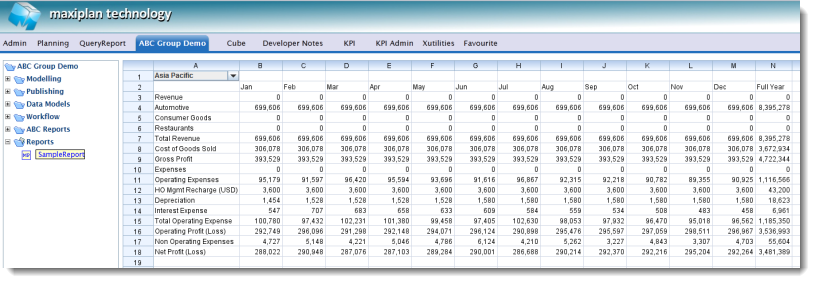
Note that the same report could also be delivered to Excel using the Maxiplan Reporter Add-In for Excel. You only need to define a report once and it can be delivered either to a web browser or to Excel.
A STARTREPORT/ENDREPORTER block of commands is simply a subset of the scripting language, and therefor can also contain scripting commands and functions which provide logic control, computational and the ability to read and write data.
More details on the Reporting commands and functions available can be found in the section, Basic Reporting Commands and advanced Reporting Functions.
More details on writing application scripts can be found in the separate help guide 'Writing Maxiplan Application Scripts'.
See also
| 


 Page URL: