Home > Working with Planning Projects > Building an Application > Building Application Models > Building A Cube Model > Selecting a Period Set
Selecting a Period Set
Last Updated 5/28/2012 4:08 PM
To define the Period Set to be used for a model, click on the Period tab and select the Period Set we wish to use for the model. You can select either Global Periodset (common across the projects in the instance), or Local Periodset (only available for the current project).
For our expenses model, we wish to use the Monthly Period Set. There is only one Exchange Rate set defined for Monthly which is the Monthly Rate, but if more than one exchange rate table has been defined for the Period Set, select the Exchange Rate table to be used.
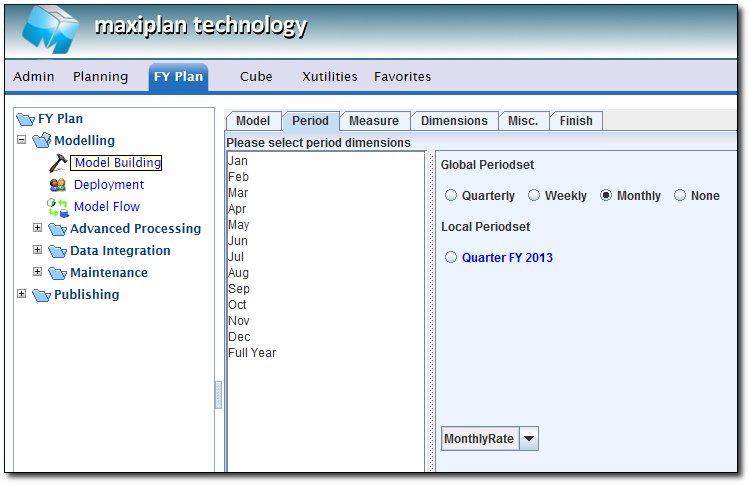
Tip: Don't worry if you are not using currencies for your model. Selecting the Exchange Rate simply defines a currency set, but this will not be activated if you do not define a currency dimension (see later).
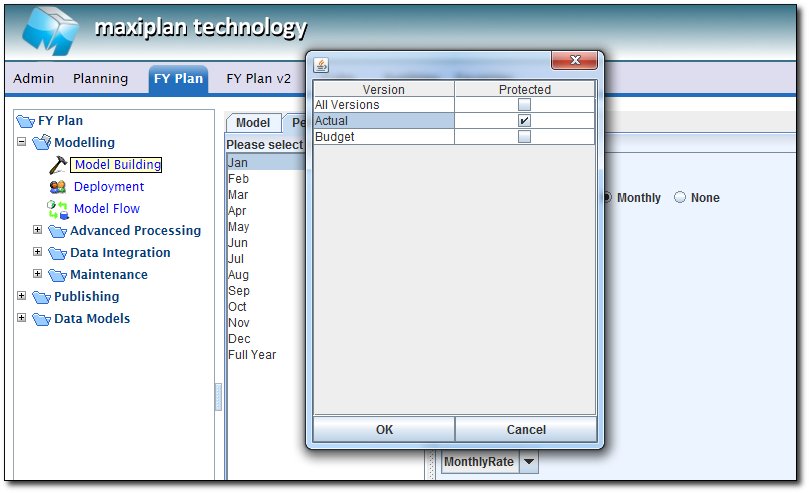
To Protect a period for a specific version (for example, Protect all the past actual months (example : Jan-Mar) for Actual Version, then double click on the period, then select which version you want to protect. Once a period is protected, the color will turn to red.
Building a Cube Model
| 


 Page URL: