LinkIndexPrint
Contents
 Welcome
    Ask MaxiPlan
 Using Cascade Planning
    Data Entry Shortcuts
 Working with Planning Projects
    Designing A Cascade Project
    Project Management
       Creating and Maintaining Projects
       Period Sets
       Currencies
       Creating A Splash Screen
       Allowing Other Users Access
       Backup and Restore
       Virtual Period Definition
       Deployment Alias
       Publish Documents
       Project Status
    Building an Application
       Building Application Models
          Building A Cube Model
             Basic Setup
             Selecting a Period Set
             Measure Settings
                Defining the Measures List
                Setting Measure Attributes
                Measure Formatting
                Defining Calculations for Measures
                Other Functions for Measures Editor
                Cross Referencing Measures
                   Dimension Order in Planning Models
                   Cross Referencing Within The Same Model
                   Cross Referencing to Another Model Cube
                   Cross Referencing to the Parent of the node
                Measure Logic Functions
                   PREVIOUS function
                   SUM function
                   MAX function
                   MIN function
                   DEPRECIATION function
                   INT function
                   ROUND function
                   ROUNDUP function
                   ROUNDDOWN function
                   IF Function
                   SWITCH Function
             Dimension Settings
                Defining Dimension Lists
                Defining Dimension Properties
             Miscellaneous
             Finishing The Model
             Advanced Features
                Specifying Consolidation Logic
          Building A Transaction Model
             Basic Set Up
             Defining Dimension Lists 
             Defining Transaction Model Fields
             Additional Definition for a List Field
             Additional Definition for an Expression field
             Additional Definition for a Lookup Field
             Optional Validation for Text, Date, Integer & Value Field
             Defining Field Format & Access
             Miscellaneous
       Model Flow and Linking Models
          Using Links (the 'Push' Method)
          Cross Referencing (the 'Pull' Method)
       Deployment and Workflow
          Deploying Models for Input and Review
          Allowing Users to Extend Models
          Setting up and Managing Workflow
          Workflow for Users
       Advanced Project Functions
          Measure Filters
          Jobsets
             Defining A Jobset
             Run Jobsets
          Data Integration
             Create Dynamic Model
             Import to Cube
             Import to Transaction
             Export Cube Data
          Maintenance
             Model Maintenance
             Link Maintenance
             List Maintenance
             Calculate all cubes
             Versions
          Pre/Post Rules
 Reports and Scripting
    Define Scripts
    Define Reports
    Publish Documents
    Manage Scripts


Home > Working with Planning Projects > Building an Application > Building Application Models > Building A Cube Model > Measure Settings > Measure Formatting

Measure Formatting
Last Updated 2/21/2012 11:38 PM


The Measure Format attribute enables certain formatting options for the measures defined in the model.

To set the layout attributes for a particular measure, first select the desired measure and then select the icon to display the layout properties in a pop-up menu.
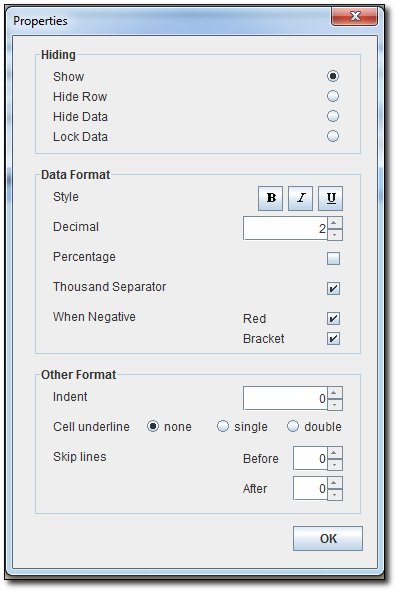


Hiding Options :
- Show : As Default, it will show both the measure name & the data, and enable input data for leaves node.
- Hide Row : It will hide both the measure name & the data , example usage is for hidden measure used for calculation/flag.
- Hide Data : It will hide the data, but still show the measure name, example usage is for the Group heading of measures.
- Lock Data : It will show both the measure name & the data, but disable input data for leaves node.

Data Format :
- Style : Set the data of the measure to be in Bold, Italic, or Underline
- Decimal : Set the decimal digit of the data
- Percentage : Set whether the measure is a percentage measure (will put %)
- Thousand Separator : Whether to put the thousand separator or not
- When Negative : Set the format for Negative value data (Red Colour and with/without Bracket)

Other Format :
- Indent : Set the indentation number of the measure displayed on the grid
- Cell underline : Set the underline type for the data (none, Single, Double)
- Skip Lines : Set number of line(s) to skip before or after the measure

You can define different Measure Formatting for Leaves Node and Consolidation Node, if you select "User Specified" on the Consolidation Logic.


See also