Home > Working with Planning Projects > Building an Application > Advanced Project Functions > Pre/Post Rules
Pre/Post Rules
Last Updated 3/9/2012 2:21 AM
The Pre/Post Rules function lets you define additional rules that can be calculated for ANY dimension
It can be BEFORE (for Pre Rules) or AFTER (for Post Rules) model calculation (but before consolidation).
To get to the Pre/Post Rules function, navigate to (project name)>Advanced Processing>Pre/Post Rules
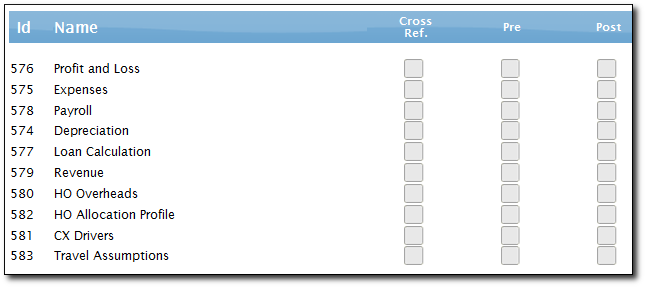
To add a pre/post rule for a model, click on the corresponding box with the model name and it will bring up a screen for you to define the rules.
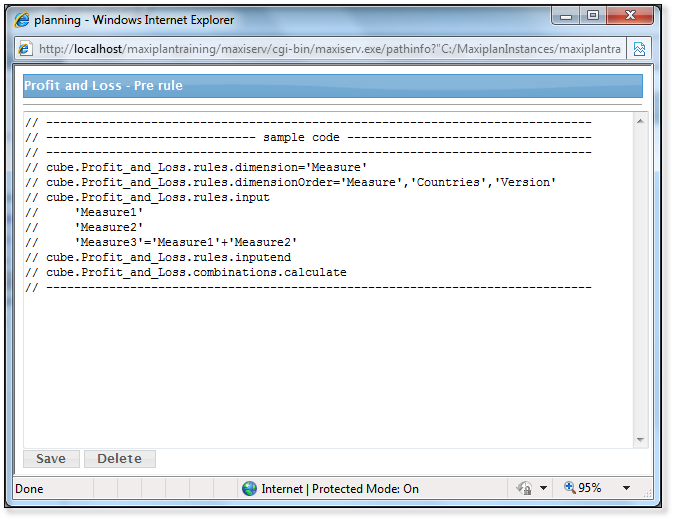
It is useful for calculations in a dimension. However, it is executed for all combinations in a model. Therefore, please use with care.
Cross-reference calculations can be included as well.
Example:
// ------------------------------------------------------------------------------
cube.Balance_Sheet.rules.dimension='Movement‘
cube.Balance_Sheet.rules.dimensionOrder='Version','Entity','Measure','Movement‘
cube.Balance_Sheet.rules.input
'Opening_Balance‘
'Expenses_Movements‘
'Capex_Movements‘
'Stock_Movements‘
'Income_Movements‘
'Journal_Adjustments‘
'Final_Balance'=PREVIOUS('Final_Balance')+'Opening_Balance'+'Expenses_Movements'+'Capex_Movements'+'Journal_Adjustments'+'Stock_Movements'+'Income_Movements‘
cube.Balance_Sheet.rules.inputend
cube.Balance_Sheet.combinations.calculate
// ------------------------------------------------------------------------------
// The above calculates the final balance sheet from the various movements
// by applying calculations to the Movement dimension, which comprises the Opening Balance member
// , several movement type members and a Final Balance member
The Cross Ref option allows you to do calculation using data from a model in another project.
cube.Expenses.structure.dimensions='Version','Countries','Measure'
cube.Expenses.structure.columns=1-13
cube.Expenses.maxidb.database='M00000444'
// ------------------------------------------------------------------------------
You will have to define the Structure dimension, the columns structure, and also what is the Model ID. However please be reminded that this model ID won't get updated when you restore the project to another machine. Therefore, a manual update is required.
See also
| 


 Page URL: